Skip to content
Budget

Works offline. Your data never leaves your computer.

See every balance, every day, months ahead.

Budget forecasts your checking, cards and loans day by day, so you know whether the bills will clear, when a card is paid off, and what the interest will cost you, before it happens.

Windows and Linux · No account, no email, no card needed for the trial

Forecast page: a year of balances for ten accounts on one graph, with interest and break-even day above it

Your data stays on your device

Budget is a desktop app, not a website. Your accounts and transactions live in a database file on your computer. There's no sign-in, no cloud copy, no bank password to hand over, and nothing for us to sell or lose in a breach.

  • No account. Install it and start. Nothing to sign up for.
  • No bank logins. Import the statements you download yourself.
  • Encrypted. AES-256 on disk, backups too, with a recovery key only you hold. Add an app lock if others use the computer.
  • No tracking. The app never sends anything about you or your money.
  • Backed up. Automatic, checked copies on the schedule you pick, and one before every import.
  • Yours to take. Export everything to a file or spreadsheet at any time, even after the trial.

What's in version 1

Every screenshot below is the real app, running a made-up household's data.

A forecast for every account, every day

Add your paychecks and bills once, and see each balance day by day, up to years ahead. Card statements close and come due on their real dates, interest builds the way your bank charges it, and promo rates end when they end. The forecast shows when you break even, what you'll pay in interest, and the day checking gets too low.

  • Statement closing and due dates, grace periods
  • Daily or simple interest, promo and deferred-interest rates
  • Payment rules: pay the minimum, the statement, or a set amount
  • Snowball and highest-interest payoff plans, compared side by side
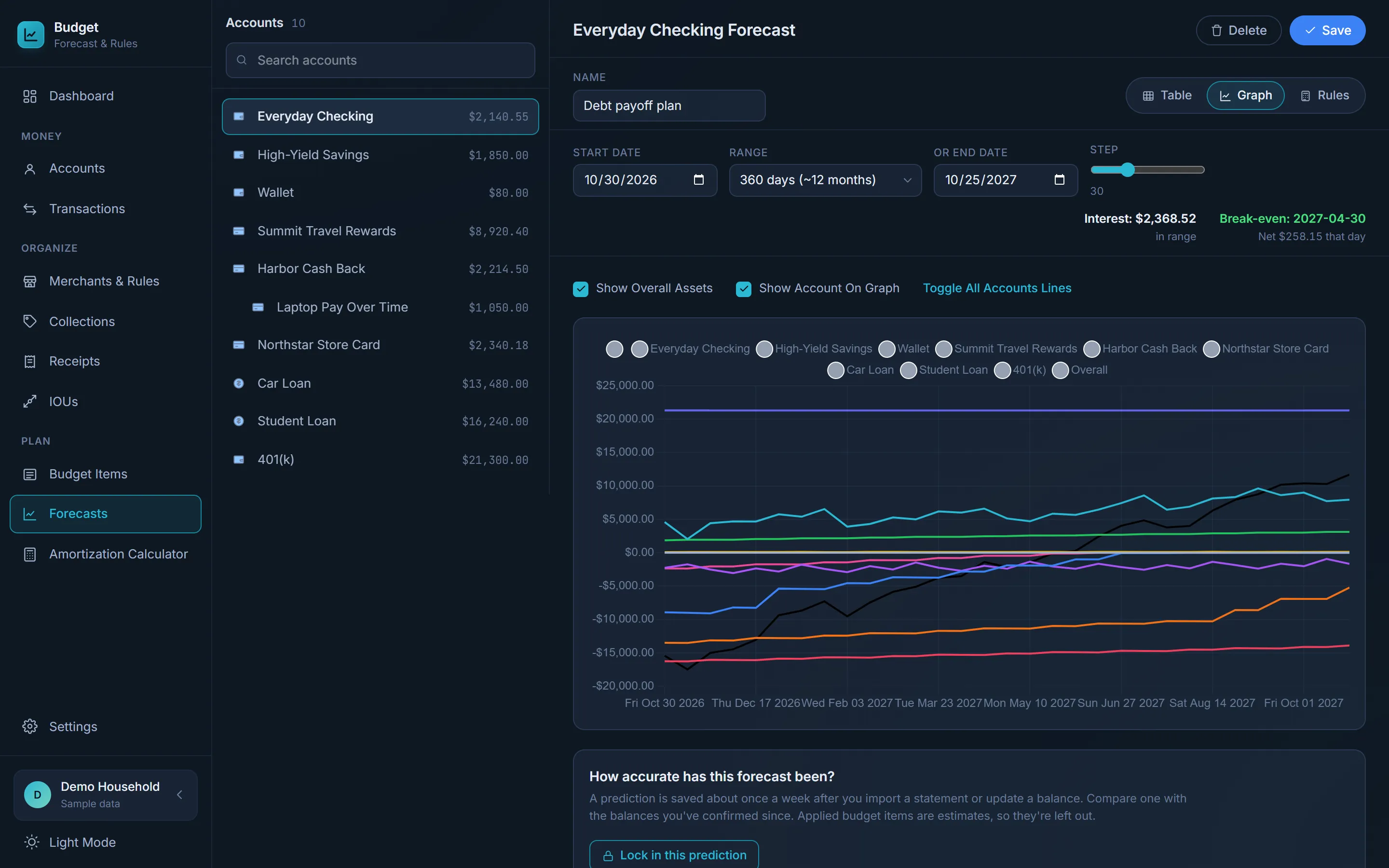
Forecast page: a year of balances for ten accounts on one graph, with interest and break-even day above it

All your accounts in one place

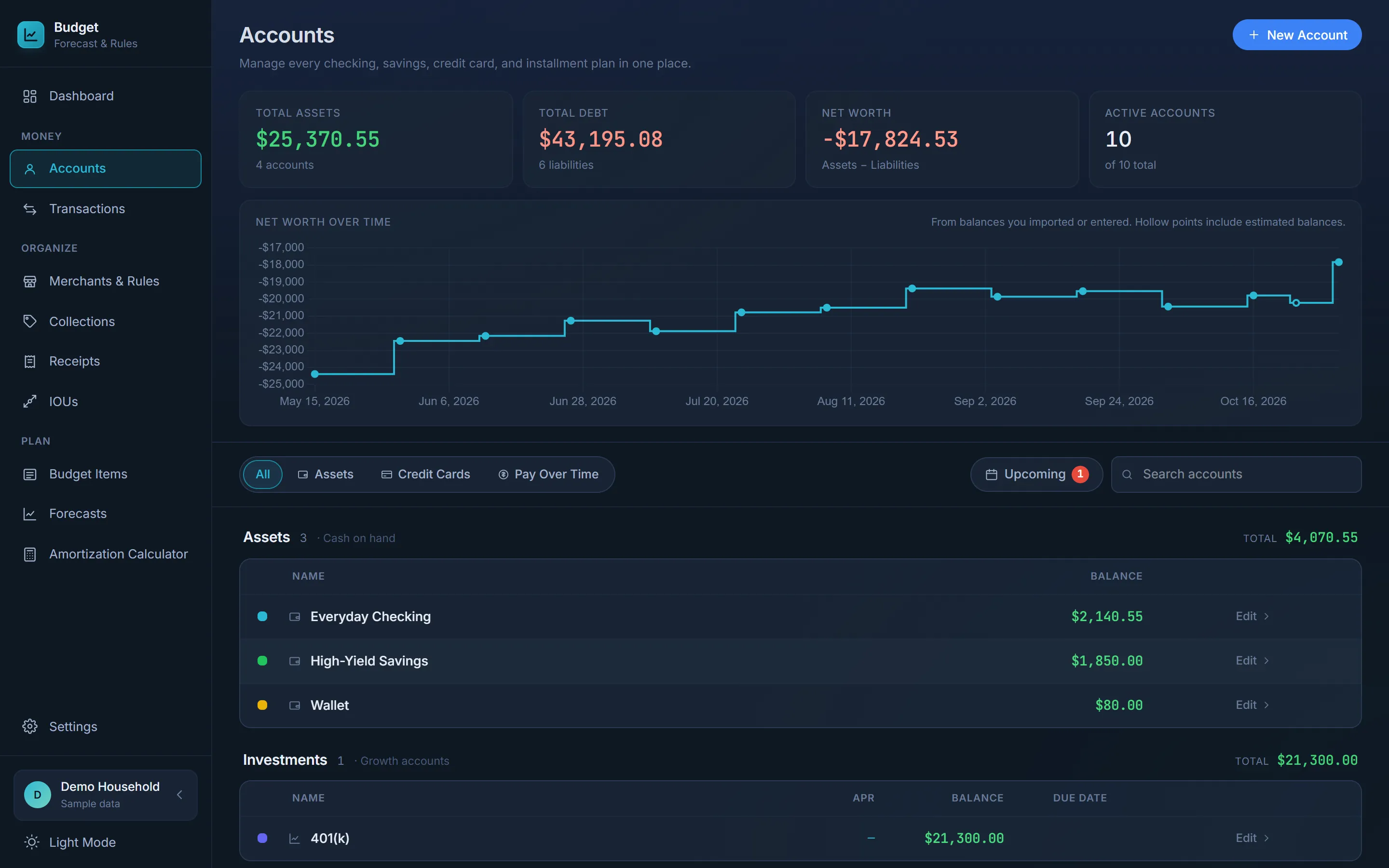
Checking, savings, credit cards, pay-over-time plans, loans and investments, grouped by type, with what you own, what you owe and your net worth at the top. Net worth over time builds up from the balances you confirm.

  • APR, statement balance and due date for each card
  • Promo plans with their monthly payment and end date
  • Net worth over time
Accounts page: total assets, total debt, net worth, and a net worth over time chart

Import statements, and let rules do the sorting

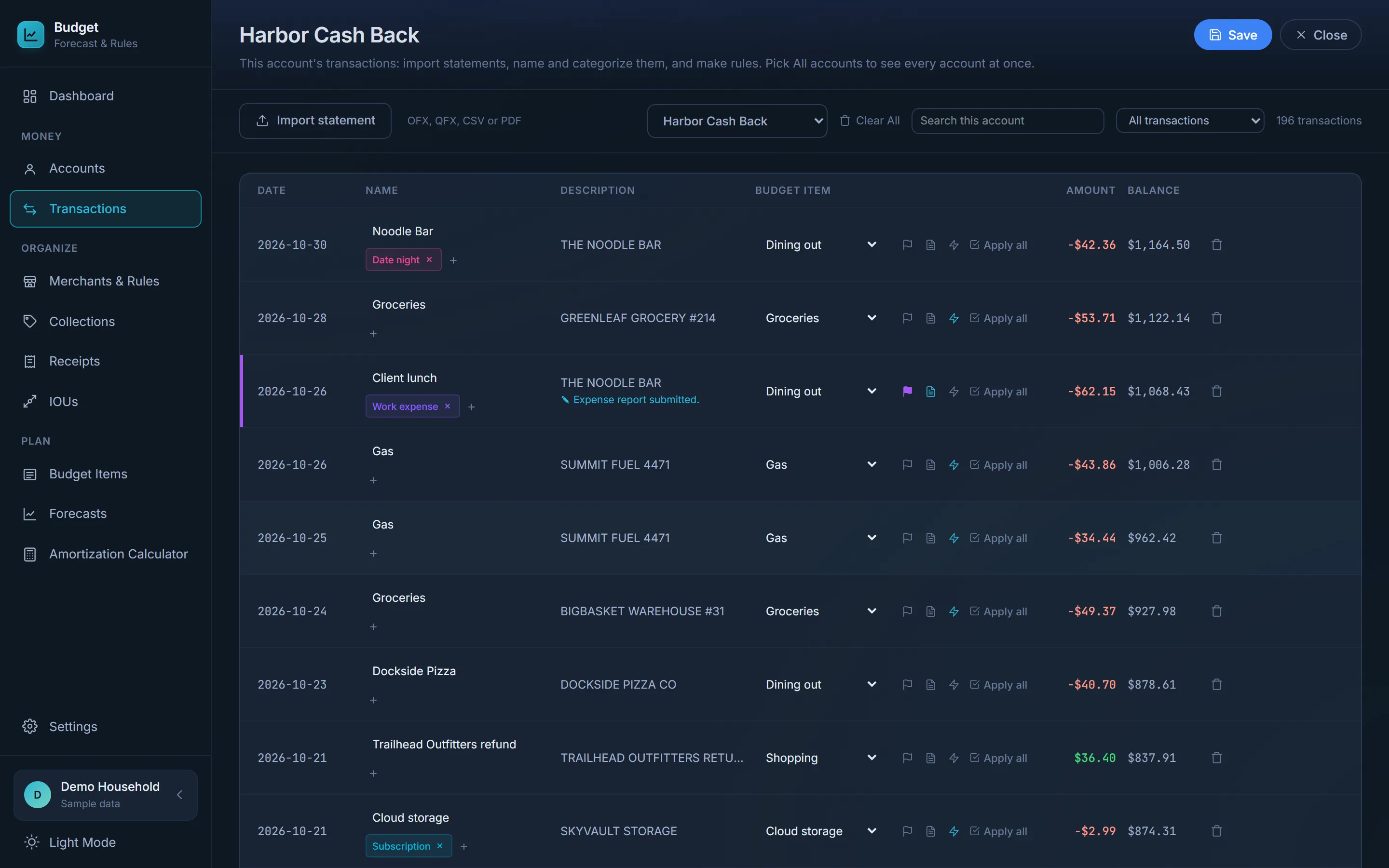
Bring in your bank's OFX, QFX or CSV export, or a PDF card statement. Rules name each transaction and assign its budget item as it comes in, so a month's import takes a minute to review instead of an evening to sort.

  • PDF statements from Chase, Amex, Bank of America and Capital One
  • Rules by merchant, with amount ranges
  • Tags, flags and notes on any transaction
Account history: transactions with names, tags and budget items filled in by rules

Budget items: the income and bills that repeat

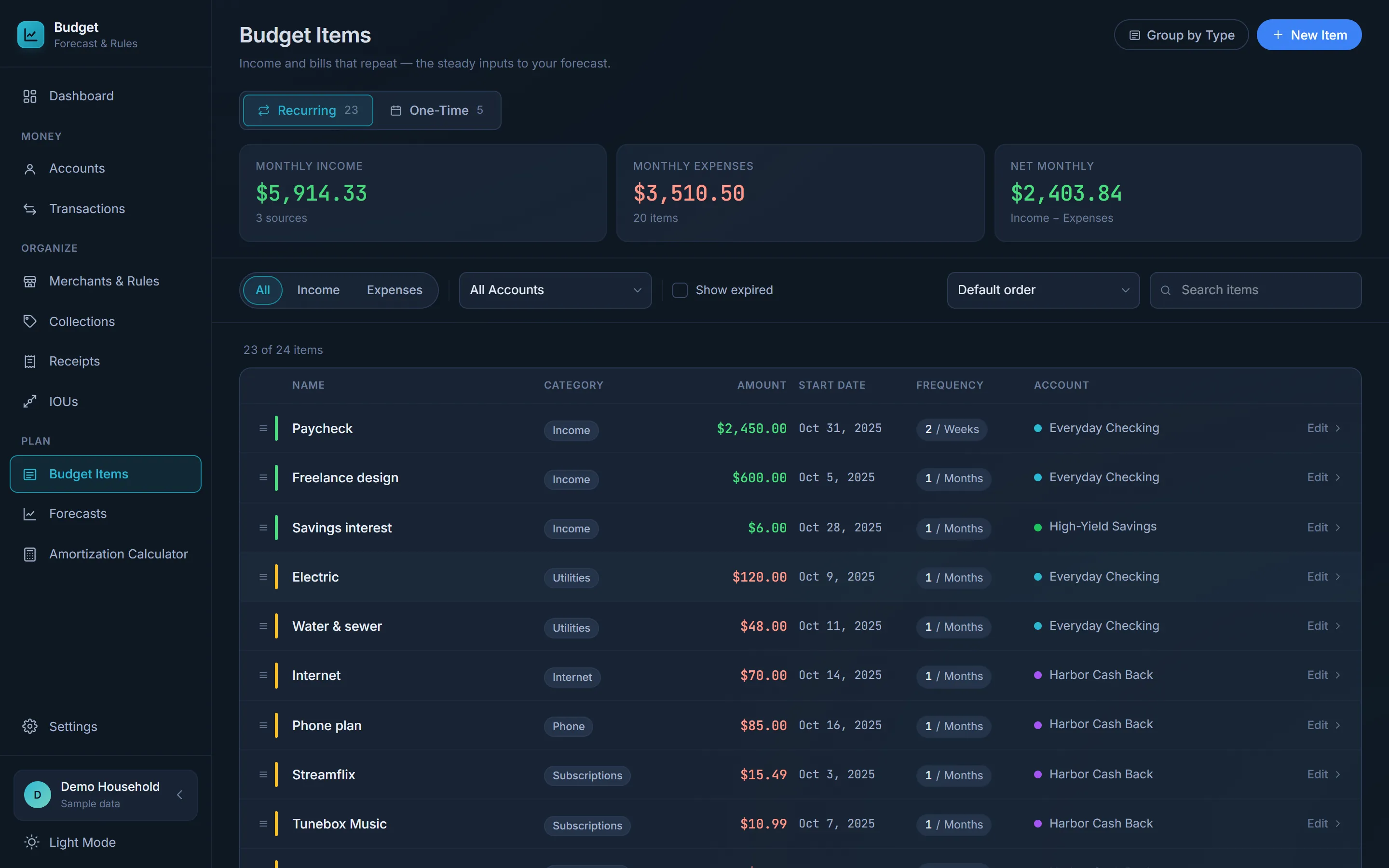
Every two weeks, monthly, yearly, or once. Each one belongs to an account and feeds the forecast. See your monthly income, expenses and what's left over at a glance.

  • Any schedule: days, weeks, months, years
  • Optional end dates for things that stop
  • One-time items for refunds, bonuses and big purchases
Budget items: monthly income, expenses and net, with a list of recurring items

Expected vs. actual: how right was the forecast?

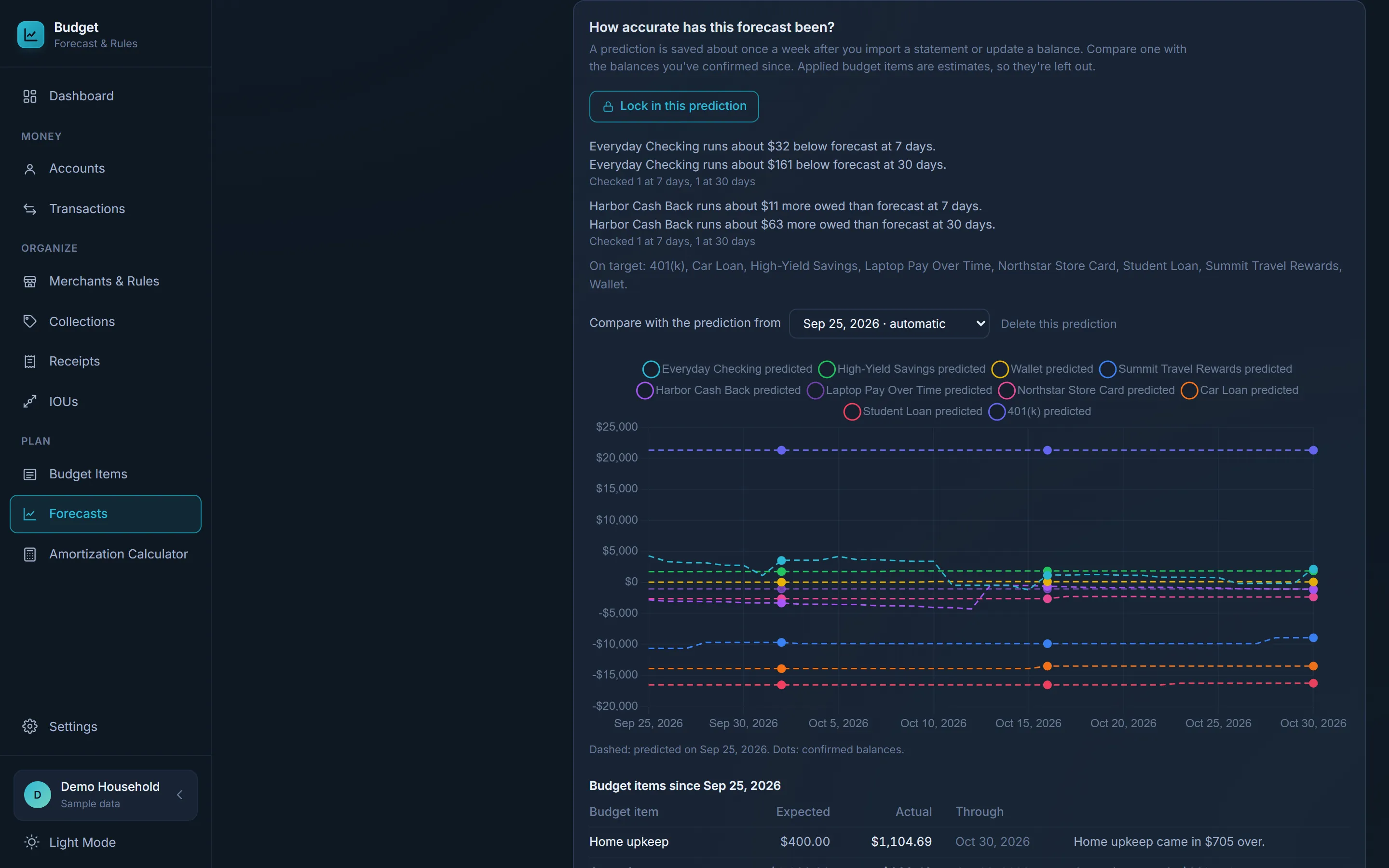
The app saves its prediction as you go and later checks it against the balances you actually had. It tells you in plain English which accounts run over or under, and which budget items came in higher than planned, so your next forecast is closer.

  • Predictions saved automatically, or lock one in yourself
  • Per-account misses at 7, 30 and 90 days
  • Budget items: expected vs. what you really spent
Forecast accuracy: plain-English summaries per account and a predicted-vs-confirmed balance chart

And the rest of version 1

Dashboard

Each month at a glance: spending by category or budget item, budget vs. actual, and what's due in the next two weeks.

Collections

A trip, a wedding, a renovation: tag its transactions and see the total against a budget, by tag, account or category.

IOUs

Costs shared with one person, either way. Split evenly, by percent or a set amount, and see who owes what.

Receipts

Keep a photo of each receipt. The app reads the store, date, total and items on your computer, and tracks prices over time.

Split transactions

One $200 shop, two budget items: split a transaction into parts, each with its own amount, budget item and tags.

Amortization calculator

See how a loan pays down, and what extra payments, paying every two weeks or a lump sum would save.

Search everything

Every account's transactions in one list, searched by name, note, account, tag or amount.

Nothing slips while it's closed

Open the app after a few days and it offers the paychecks and bills that came due in between, ready to apply.

Make it yours

Light and dark themes, an accent colour, fonts and text size, and hide the pages you don't use.

Click around before you install anything

The demo is the app with a sample household already filled in: ten accounts, a year of transactions, bills, and a debt payoff plan. It runs in your browser and needs no download.

The trial also has a "Try it with demo data" button on its first screen.

Pay once. No subscription.

Try everything free for 30 days, then buy a licence if it's earned its place.

Founders licence

Launch price

$29$49

one time, for the first 20 buyers

20 of 20 left

Buy for $29

If you'd like, your name goes on the Founders list.

Every licence includes

  • The full app on Windows and Linux
  • Every 1.x update, free
  • Use it on all your own computers
  • Never expires: your version keeps working
  • Email support
  • 30-day refund, no questions asked

After the Founders licences sell out

The price goes to $49, still one time.

The trial
Every feature for 30 days, no email needed. When it ends, the app turns read-only: everything stays, you can still look and export, and a licence key picks up where you left off.
Updates
Every 1.x update, free. Your licence never expires: the version you bought keeps working.
Refunds
Not for you? Email within 30 days of buying for a full refund.

Know where your money will be.

Free for 30 days. No email required.